Soccer Games: Soccer Stars
Miniclip.comSports
4.549.06K Reviews
- Version
- 37.1.1
- Installs
- 100.00M
- Age Rating
- Everyone
Screenshots
Our Review of Soccer Games: Soccer Stars
 Analysis by Appyee
I usually judge a casual sports game by what happens after the first few matches: does it still feel worth opening once the novelty wears off, and does it fit naturally into a day rather than demanding one? Soccer Stars has a good case for staying on my phone because its matches are built around quick decisions, not learning a complicated control scheme. It is a sports game from Miniclip.com, and its tabletop approach gives it a different rhythm from the usual mobile football games.
Why the first matches click
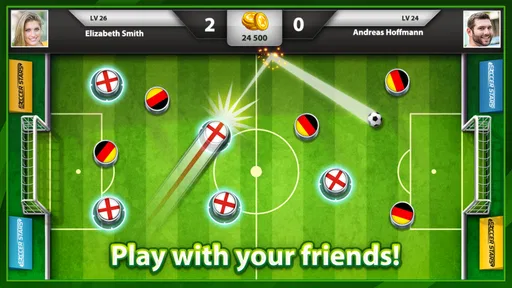
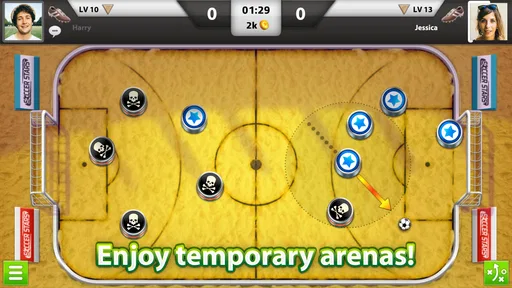
Instead of steering a full team around a pitch, you take turns flicking disks that stand in for players. A move can send a teammate toward the ball, open a passing lane, block an opponent, or attempt a shot. The rules are easy to grasp, but that does not make every turn obvious. Where a disk lands can shape the next move, so even a simple flick asks you to think about what your opponent might do in response.
That compact format is the main reason I can recommend it to someone who wants football flavor without a full match simulation. You do not need to remember a long list of controls or commit to a lengthy session to understand the point. The game’s appeal is closer to a small tactical puzzle played against another person: make a useful move now, while trying not to leave an easy answer for the other side.
In my experience, the best early habit is to resist treating every turn as a shot attempt. A direct strike may look tempting, but moving a disk to clear a lane or protect the goal can be more useful. I also try to notice what a flick leaves exposed after the ball moves. That small pause before acting makes the match feel less like random tapping and more like a contest of angles and timing.
What gives it value after the novelty fades
Once the basic flicking feels familiar, the online matches are what give Soccer Stars a reason to come back. Playing another person changes the character of the same board: a move that works against one opponent can be easy to read for the next. That makes it a stronger fit for short competitive sessions than a solo activity with a fixed sequence of challenges. The game is free to download, and its large audience—over 100 million installs and an average rating of 4.6 from around 2.4 million ratings—suggests that this quick-match idea has broad appeal.
It is particularly handy in the gaps that are too short for a deeper sports game. I can imagine opening it while waiting for a meal, taking a turn or playing a match, then putting the phone away without needing to remember a complicated career mode. A friend challenge can make that same spare moment more personal: the fun is not only in scoring but in seeing whether someone you know spots the same angles you do.
For a recurring routine, I would treat it as a light competitive game rather than a football simulator to master. If I have a few minutes and want to make a decision or two, it suits that mood. If I want to follow a season, build a realistic squad, or control players continuously, a conventional football game is a better match. Soccer Stars trades realism and direct movement for small, readable turns; that is its identity, not a missing version of a console-style game.
Keeping a useful rhythm without extra fuss
The day-to-day burden is modest in the sense that the central activity is immediately understandable: enter a match, assess the board, and flick. That makes it easy to return after a break. The more important maintenance question is not whether I need to practice for ages, but whether I enjoy the repeated format enough to make another match appealing. If I do, the low learning barrier helps. If I want a new activity every time I open a game, the same tabletop field can start to feel familiar quickly.
One practical way to keep matches from becoming careless is to use a quick mental checklist before each move: where will the disk stop, what line does it open, and what can the opponent do next? It takes almost no extra time, but it makes defensive positioning part of the fun rather than an afterthought. I would also avoid chasing a risky shot simply because a turn is available; a safer setup can produce a clearer chance later.
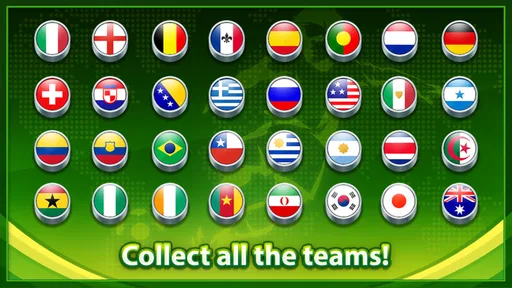
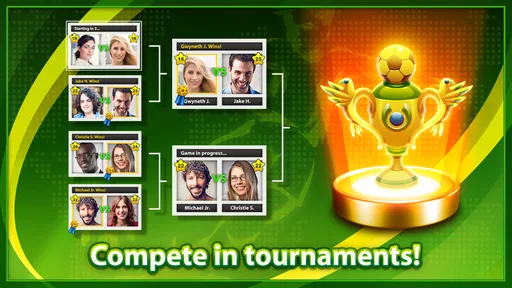
Team choices and visual customization add a personal layer, while tournaments and the prospect of earning coins give competitive play a broader frame. Those elements can help a regular player set a small goal, such as trying a different team or testing a more patient style. They are not a substitute for variety in the match itself, though. The lasting draw still comes from the opponent and the decisions on the board, so players who do not enjoy head-to-head play may find the surrounding progression less compelling.
Where friction can build
Online competition is a strength, but it also makes the experience depend on the kind of opponent and the quality of the connection at that moment. A quick game is only satisfying when both players can take part smoothly. If you are looking for a predictable solo session, or dislike waiting for another person to make a move, a single-player sports game will usually feel more controlled. I would choose Soccer Stars for interaction and quick tactical exchanges, not as a guaranteed, uninterrupted offline pastime.
There is also a ceiling to the simplicity. The disks and turns make the game approachable, but they limit the sense of movement and spectacle that fans of animated football expect. A player who wants to dribble, switch between teammates, and shape every second of play may find the tabletop presentation too abstract. I see that as the main reason to skip it: not because the idea fails, but because it serves a different appetite from full-field football.
Progression and purchases deserve a little restraint. The game is free, with optional in-app purchases priced from $0.49 to $119.99 per item. I would not treat spending as a requirement for enjoying the basic match format, and I would decide on a budget before buying anything rather than letting a competitive streak make the choice. Coins and unlocks can provide goals, but the most meaningful test of skill remains how well you read the board and plan a turn.
Ads and reward prompts can also affect the relaxed feel, even when they offer a way to earn something without paying. If I am opening the game for one brief break, I would focus on the match itself and ignore optional extras unless I actively want them. That keeps a short session short. Players who strongly dislike any advertising or purchase prompts should be aware that the free-to-play structure may not feel as clean as a one-time paid game.
Who should keep it installed
I think it suits casual players who like head-to-head contests, enjoy working out angles, and want a sports game that does not ask them to operate a whole team in real time. It can also work for friends who want a quick, low-pressure rivalry: a match is easier to fit into a spare moment than arranging a longer gaming session. The Everyone age rating makes the game broadly accessible, though parents may still want to consider its online competitive setting and optional purchases when deciding whether it is right for a child.
People who prefer quiet solo play, realistic football controls, or a story-driven progression system should look elsewhere. The same goes for anyone who gets frustrated when a small positional mistake changes the next turn. Soccer Stars rewards patience and deliberate placement, but that also means a match can feel irritating if you only want to tap quickly and watch a goal animation.
Gameplay Mechanics That Keep You Hooked
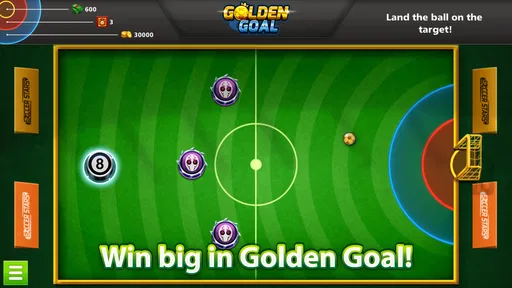
Right off the bat, Soccer Stars doesn’t try to be your typical soccer game. Instead of controlling a full team of players, you manage a set of disks representing your players on a turn-based tabletop-style field. Think of it as a blend between soccer and air hockey. You flick your players to pass, shoot, and block, aiming to score goals while outsmarting your opponent.
What I really love about this game is its simplicity. It’s incredibly easy to pick up and play, yet there’s a depth to the strategy that keeps you coming back. You need to plan your moves carefully, anticipating your opponent’s next flick. This element of strategy is what makes each match feel fresh and exciting.
A Visual Treat
Visually, Soccer Stars is colorful and engaging. The minimalistic design works in its favor, ensuring that the focus remains on the gameplay. The animations are smooth, making the flicking mechanics feel responsive and satisfying. Plus, the sound effects add a nice touch, enhancing the overall experience without being overbearing.
Customization is another area where the game shines. You can unlock and choose from a variety of teams, each with its unique flair. The customization of your team’s appearance adds a personal touch to the game, making it even more enjoyable to play.
Multiplayer Madness
The real fun begins when you dive into multiplayer mode. Competing against players from around the world is where the game truly comes to life. The matchmaking system is efficient, ensuring that you spend more time playing and less time waiting. You can also challenge your friends to a match, adding a competitive edge to those friendly rivalries.
The game also hosts tournaments, which are perfect for those looking to test their skills on a larger stage. Winning matches earns you coins, which you can use to enter higher-stakes games or purchase new teams. It’s a rewarding system that keeps you motivated to improve.
Free-to-Play Done Right
In terms of monetization, Soccer Stars adopts a free-to-play model with in-app purchases. While you can spend real money to buy coins and unlock teams faster, it doesn’t feel intrusive or necessary. You can enjoy the game fully without spending a dime, which is a refreshing approach in today's mobile gaming landscape.
Ads are present, but they’re not overwhelming. You have the option to watch ads for rewards, which is a fair trade-off for those looking to earn extra coins without spending money. The balance between free content and in-app purchases is well-struck, making it accessible for all types of players.
A few practical questions before you start
If you are wondering whether it is free to try, yes: there is no purchase price to download it, though optional purchases are available. The game is rated Everyone, and its current version is 36.11.1, with Android support beginning at version 6.0. It has been around since June 11, 2014, so this is an established mobile game rather than a brand-new experiment. Miniclip.com remains the developer behind it.
For anyone choosing between this and a typical mobile football game, I would make the decision based on the kind of control you want. Soccer Stars is about setting up a shot through turns and positioning disks; a conventional football title is better if you want continuous movement, team management, or a more realistic match presentation. Neither style replaces the other, and the distinction is useful before spending time learning either one.
How do I get more out of a match without playing longer? I focus on positioning and use defensive moves when the shooting lane is poor, rather than forcing an attempt. Can I enjoy it without spending? The free-to-play structure allows that, while purchases can speed access to coins or teams. Is it a good choice for a quick break? It can be, provided you are comfortable with online competition and the possibility that the match’s pace depends on another player.
Final Thoughts
Overall, Soccer Stars is a delightful mobile game that combines strategy, skill, and a bit of luck. Its unique approach to soccer, combined with engaging visuals and a solid multiplayer experience, makes it a good choice for anyone who enjoys quick, strategic matches. Whether you’re a casual player or someone looking for a fun way to pass the time, it offers a focused alternative to full-scale football games, though it will not suit everyone’s idea of the sport.
Its staying power depends on whether you enjoy the small tactical decisions as much as the goals. For me, that is the best reason to keep it installed: it is quick to understand, but a careless flick can still teach me to look at the board differently next time. If that kind of light competition fits your spare moments, it is worth a try. If you would rather control a full team or avoid online rivalry, another style of soccer game will be a better use of your phone’s space.
Verdict
Strengths of Soccer Games: Soccer Stars
- Simple and intuitive controls.
- Quick matches for on-the-go play.
- Engaging multiplayer mode.
- Frequent updates with new features.
- Compatible with older devices.
Limitations of Soccer Games: Soccer Stars
- In-app purchases can be pricey.
- Ads can interrupt gameplay.
- Limited offline features.
- Occasional connectivity issues.
- Graphics may feel basic to some.
Other Releases by Miniclip.com
View All
8 Ball Pool
Sports4.8

Carrom Pool: Disc Game
Sports4.4

Pure Sniper: Gun Shooter Games
Action4.8

Football Strike: Online Soccer
Sports4.8
Similar Picks in This Category
View All8 Ball Pool
Miniclip.com4.8

Pooking - Billiards City
AIM TOP GAME TECHNOLOGY LIMITED - pool4.6
Carrom Pool: Disc Game
Miniclip.com4.4

EA SPORTS FC Soccer Mobile 26
ELECTRONIC ARTS4.6

World Soccer League
mobirix4.3

Soccer Cup 2026: Football Game
INLOGIC SPORTS - football tennis golf soccer4.3
Frequently Asked Questions
What is Soccer Stars?
Soccer Stars is an engaging multiplayer soccer game available on Android and iOS. It offers a unique combination of strategy and skill, allowing players to compete in real-time matches against opponents from around the world. Featuring simple controls and a variety of game modes, it's perfect for both casual and competitive players.
How do I play Soccer Stars?
Playing Soccer Stars involves using finger swipes to control your team of discs in a turn-based match. The objective is to score goals by strategically positioning your players and executing precise shots. The game offers tutorials for new players to get accustomed to the controls and gameplay mechanics.
Are there in-app purchases in Soccer Stars?
Yes, Soccer Stars includes in-app purchases. Players can buy coins and bucks, which are used to unlock new teams, upgrade existing ones, and access special features. While the game can be played for free, these purchases can enhance the gaming experience and provide additional customization options.
Can I play Soccer Stars offline?
Soccer Stars primarily focuses on online multiplayer gameplay. However, it does offer offline practice modes where you can hone your skills without an internet connection. For the full experience, including competitive matches and leaderboards, an internet connection is required.
Is Soccer Stars suitable for all ages?
Soccer Stars is designed to be accessible and enjoyable for players of all ages. Its simple controls and engaging gameplay make it a hit with both younger and older audiences. However, parental guidance is advised for in-app purchases to ensure a secure and controlled gaming environment.
Play our best games!


